
Mailey – Email Marketing Agent
From: $20.00 / month
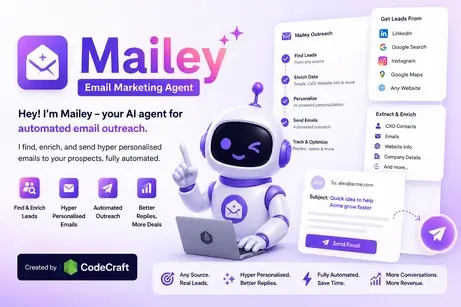
Hey! I’m Mailey – your AI agent for automated email outreach. I find, enrich, and send hyper personalised emails to your prospects, fully automated.

Your Autonomous Lead Extraction and Email Marketing Agent
Mailey can extract leads from any source, like Google Maps, LinkedIn, Facebook, Instagram. It then generate and send personalized emails on autopilot, or schedule multi-step follow-ups effortlessly.
How Mailey Powers Your Cold Outreach
Three autonomous steps from prospecting to inbox landing.
1. Target Any Lead Source
Extract direct business contacts from Google Maps, LinkedIn Sales Navigator, Instagram, or upload custom lead CSVs.
2. AI-Driven Personalization
Every email is generated uniquely with dynamic variables, personalized pain points, and natural variation to guarantee spam protection.
3. Warmup & Automated Follow-up
Multi-inbox load balancing distributes sending safely. Multi-step sequencers follow up automatically until leads reply.
Autonomous Outreach Jobs
| Campaign Name | Type | Source Target | Product Link | AI Instructions | Leads | Daily Target | Status | Actions | Created Date |
|---|---|---|---|---|---|---|---|---|---|
| Loading autonomous plans… | |||||||||
Standard Campaigns
| Campaign | Type | Lead Source | Product Link | AI Instructions | Leads | Sent | Pending | Status | Date | |
|---|---|---|---|---|---|---|---|---|---|---|
| Loading campaigns… | ||||||||||
Connected SMTP Inboxes
Add New Inbox
Connected Inboxes
Flexible Plans Built For Outbound Growth
Start free or upgrade to high-volume cold outreach and auto-warmup capabilities.
Free
Forever free for exploration
Basic
Billed monthly
Pro
Billed monthly
Business
Billed monthly
Enterprise
Billed monthly
SaaS / Reseller
Billed monthly
New Outreach Campaign
Add New Inbox
Connected Inboxes
Email Warmup Engine
Gradually ramp inbox reputation & deliverability.
Sync to CRM
Send 0 selected leads to your webhook.
We'll send a POST request with the selected leads data in JSON format.
Upload a CSV file to bulk import campaigns. Schedule daily campaigns for the next 30 days using the Scheduled Date column.
Scheduled Date format as
YYYY-MM-DD HH:MM (e.g.
2026-10-08 09:00). Future dates will automatically
be scheduled in the queue.
Sender Inboxes, specify inboxes (e.g.
[email protected], [email protected]) or leave blank to automatically rotate across all
your verified inboxes via round-robin. For Autonomous campaigns, leave
Plan Queries / Sources blank to auto-generate 30 regional search locations across the
country.
Only logged in customers who have purchased this product may leave a review.
Vendor Information
- Store Name: CodeCraft Creations
- Vendor: CodeCraft Creations
- No ratings found yet!










Reviews
Clear filtersThere are no reviews yet.